
ASTRAD Conversion Tracking
Introduction
Astrad is a mobile demand-side platform with proprietary real-time bidding algorithms that automatically adjust the bidding strategy to optimize advertising performance.
Astrad can optimize on a CPA basis, granted that it can track the “Action” that needs to be optimized. These “actions” can be events such as Downloads, Subscriptions, Leads, Registrations, Purchases, etc.
1. Scenarios
Astrad Servers need to be notified every time such an action occurs on the advertiser’s website or app to track these events.
The technologies used change depending on whether the advertiser is tracking conversions in an application or on a website.
Both cases are irrespective of where the ads are placed. For example, Astrad can place ads in an app and track conversions on a mobile web. Or it can place ads in a mobile web and then track conversions in an app. All scenarios are allowed.
1. 1. Tracking within In-app environment
In this case, the advertiser is interested in tracking conversions in an application (for example, app downloads, app registrations, etc.).
For this scenario, the industry standard is that the advertiser uses companies called “Trackers.”
Astrad is already integrated with most Trackers in the market (Kochava, Tune, Appsflyer, Adjust, etc.).
The following describes how Astrad is integrated with these trackers and how it would integrate with any other tracker that any client may have.
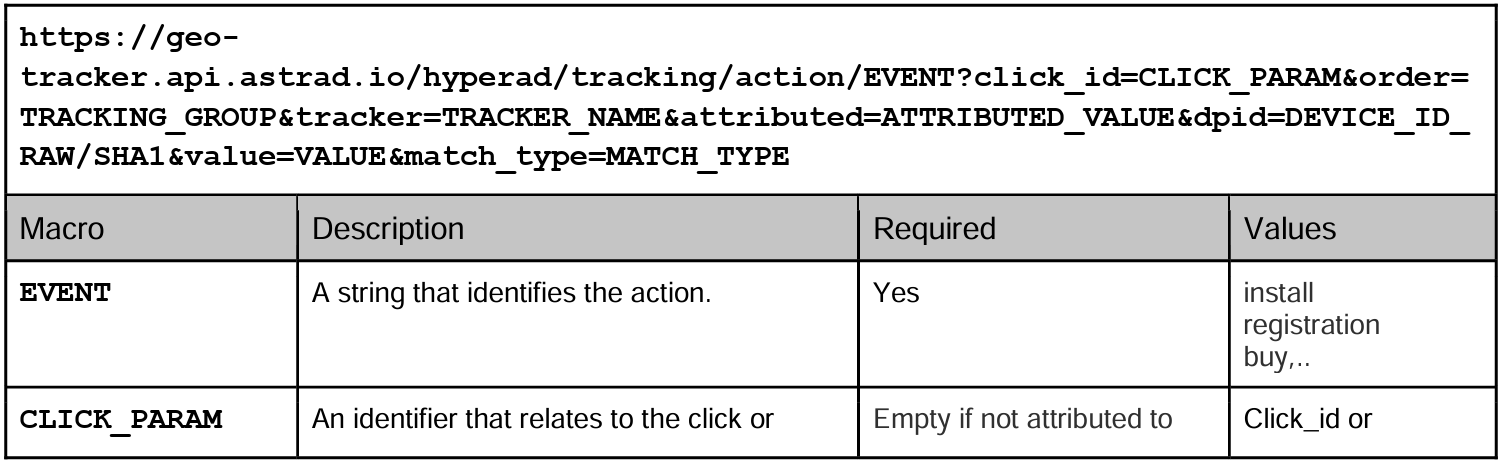
When the advertiser’s app includes a tracker (with its corresponding SDK installed in the advertiser’s app), this tracker shall notify Astrad back using the following postback URL:
1.1.1 Standard Postback

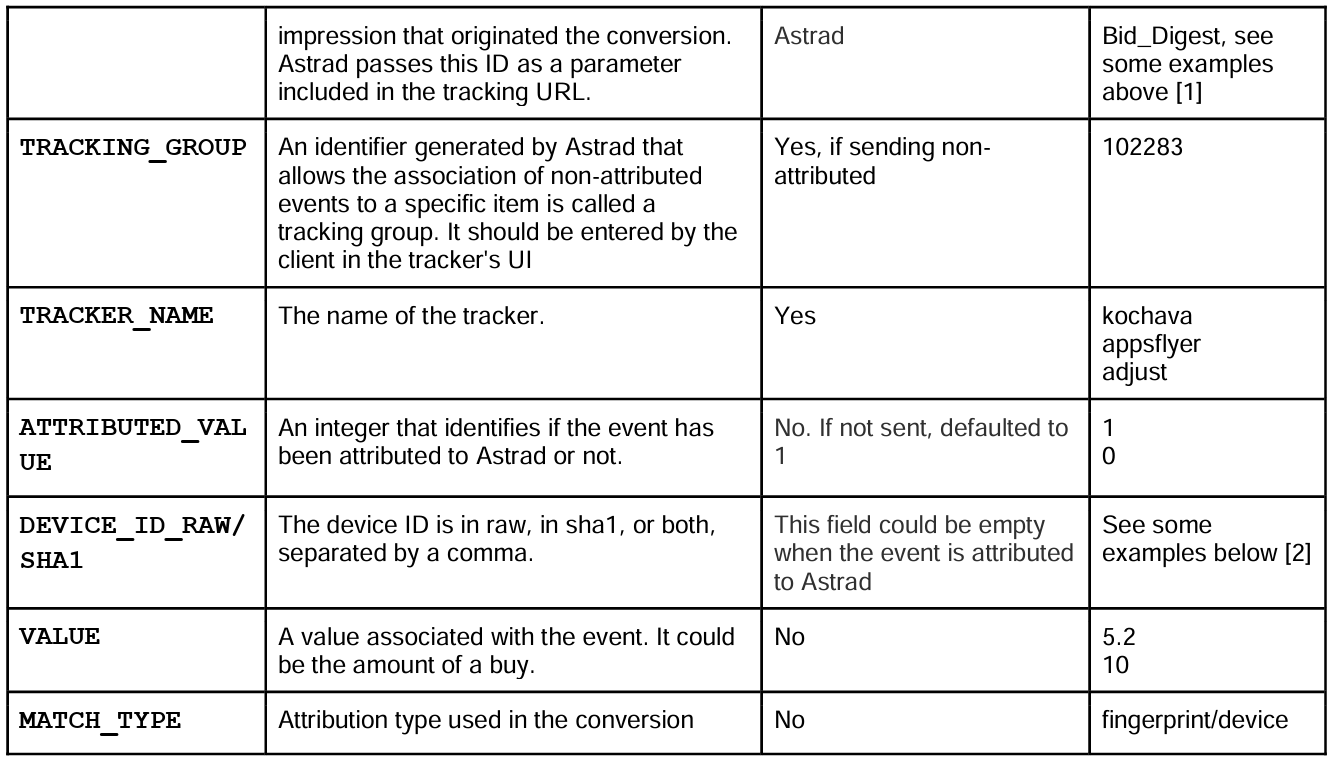
[1] If the conversion was through click attribution, the click_param will be a click_id: “0002d430 a2c2-11e7-8d66-2deb5a68ce34”. On the other hand, if it is from view attribution the click_param will be a bid_digest, a long identifier with a length of 360 characters or longer. Astrad passes this ID as a parameter included in the click URL {$CLICK_ID$} or the impression pixel {$BID_DIGEST$}.
1.1.2 Deep integration Postback
[2]
RAW: “38400000-8cf0-11bd-b23e-10b96e40000d”
SHA1: “4dfaa92388699ac6539885aef1719293879985bf”
SHA1,RAW: “4dfaa92388699ac6539885aef1719293879985bf,38400000-8cf0-11bd-b23e-10b96e40000d”
Examples of real click URLs and real postback URL would be:
Click URL:
http://client_app_tracker.com?campaign=123&supplier=abc&CLICK_PARAM=abbbbccdd112233
Postback URL for the previous click URL:
Astrad can pass many other parameters in the click URL, such as Device ID (IDFA, Android ID), app ID, etc. You can find all the macros we support in the down left corner of the edition mode of any of your creatives folders (in the workspace). Please see the image below:
1.1.3 Tracking conversions with javascript tags
In this case, we can track conversions but no clicks, by doing the following:
Postback
Tracker shall notify Astrad back using the following postback URL:
https://geo-tracker.api.astrad.io/hyperad/tracking/action/EVENT?click_id=var1&tracker=TRACKER_NAME
- Where EVENT is a string that identifies the action (for example: install, conversion, registration, lead, purchase, etc.)
- Where TRACKER_NAME is the name of the tracker or an identifier of your company. Example: “AppsFlyer”
- Where var1 is a random variable used to save the identifier of the impression passed by Astrad
Javascript Tag
In your tag, you have to add the macro var1={$BID_DIGEST$} instead of the macro of clicks.
{$BID_DIGEST$} is an ID (number) which identifies the impression which originated the conversion. Astrad passes this ID as a parameter included in the javascript tag that redirects the user clicking on the ad served by Astrad.
1.2 Tracking in Web environment
In this case, the advertiser may want to track conversions on a web page (for example, purchases, registrations, visits to the landing page, etc.).
The advertiser may choose to use one of these 2 options:
A) The postback URL explained in the previous point:
B) A Pixel from Astrad:
In this case, in order for Astrad to be able to track conversions, the advertiser must place a Astrad “pixel” in one or several of their web site pages.
Astrad’s pixel is just an image tag with the source pointing to Astrad servers.
The pixel must be placed in the conversion page directly. When fired, Astrad will access a cookie (that it placed in the user’s browser when the user clicked on the Astrad ad) to retrieve the “click identifier” and store the conversion in the Astrad system.
This pixel can be generated in the Workspace.
There are two options for the pixel. The advertiser may choose which works best for them:
1. Simple image pixel with cache booster param to be replaced by tracker/advertiser/whomever installing the pixel in the website:

@param order (required): This parameter can be created from the Workspace > Tracking pixels
@param action (required): It should be a string, and it is the action registered with that pixel (conversion, purchase, etc…)
@param %%RANDOM%%: It is a placeholder that must be replaced by the tracker/advertiser/whoever is installing the pixel in the website.
2. ASTRAD Simple Javascript tag that generates the pixel with the cache booster:
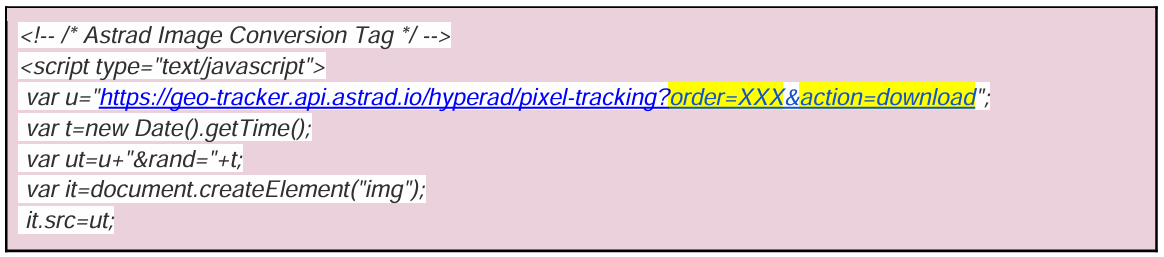

@param order (required): This parameter can be created from the Workspace > Tracking pixels
@param action (required): It should be a string, and it is the action registered with that pixel
(conversion, purchase, etc…).


