
Once I’m in the platform. Where do I begin?
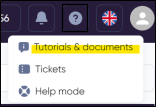
If you’re unsure about where to start, I suggest taking advantage of our platform guide. You can find this helpful resource in the menu above, marked by the ‘?’ sign. The guide offers step-by-step instructions and valuable insights, serving as an excellent reference to familiarize yourself with the platform’s features.
What types of ads can I run through your platform?
Display, Rich Media, Video and Audio ads.
Can I upload several creatives at the same time?
It is indeed possible. I suggest exploring our guide, particularly the ‘upload creatives’ section, where you’ll find detailed instructions on various methods for uploading multiple creatives simultaneously.
How can I know what bid to use?
In such situations, we advise referring to our Analytics section. Within this section, you can apply filters to assess the campaign setup, providing you with an estimated price to consider. Subsequently, you can make adjustments based on the campaign’s performance to ensure optimal results.
Additionally, there is an option accessible directly from the line. After adding the creatives, you’ll find a button that, when clicked, automatically sets the recommended bid based on the country and type of creative.
 For more intricate situations, I suggest utilizing the help chat or reaching out to your designated account manager.
How to install a pixel in a website? (Standard procedure)
Then go into the Code Injection area of your website backend (either directly or through your content manager software) to install the code in the header section of the desired page.
The implementation of the pixels in different websites can differ from each other. But if you are having difficulties on how to implement it yourself. We recommend sending this to the company web developer and mentioning to them to install the provided codes in the header of each desired website.


