
Traffic Source
-
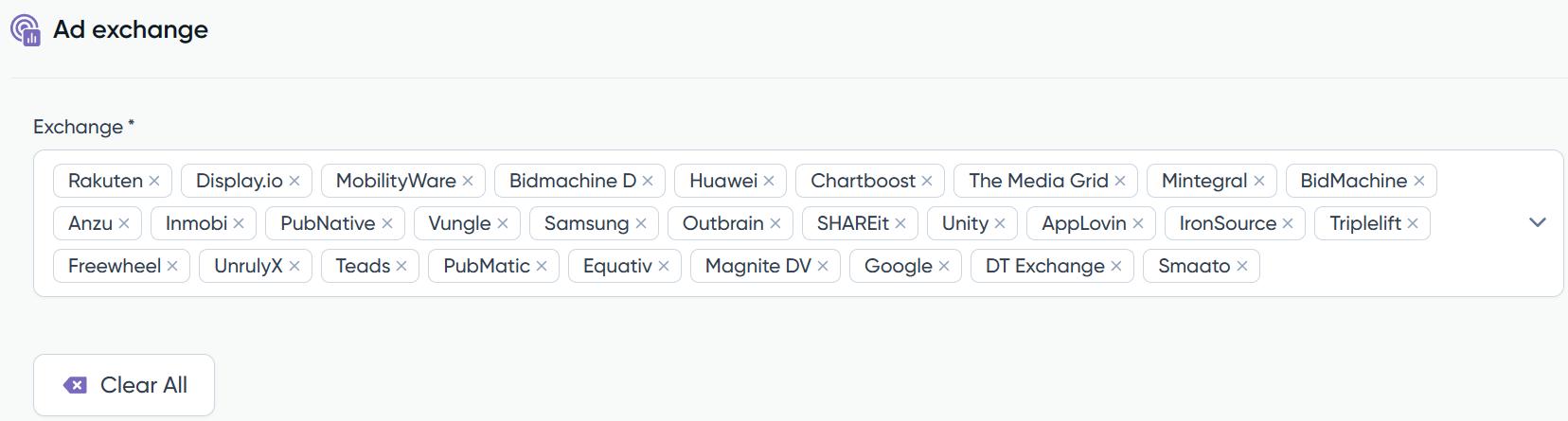
Ad Exchange
In this section, you have the flexibility to choose the exchanges through which you wish your campaign to be delivered. By default, all available exchanges are pre-selected, offering a broad spectrum of potential platforms to showcase your campaign.However, you have the option to customize this selection based on your preferences or specific targeting needs. This flexibility allows you to tailor the campaign’s distribution by opting for specific exchanges that align best with your campaign objectives, audience targeting, or performance goals. Adjusting these settings ensures that your campaign is delivered across exchanges that most effectively reach your desired audience or meet your advertising goals. You will be able to select the exchanges you want the campaign to deliver. By default they are all selected.
-
Inventory Segments
In this section, you can designate the inventory lists that were previously uploaded in the ‘Assets’ section. These lists, known as whitelists and blacklists, serve specific purposes in targeting or excluding particular inventory sources.Whitelists allow you to specify preferred inventory sources where you want your ads to appear. They act as an inclusionary filter, enabling your campaign to bid specifically on those chosen sources. Meanwhile, blacklists help in excluding certain inventory sources where you do not want your ads to appear.An interesting feature is the ability to combine both whitelists and blacklists. When employing two whitelists simultaneously, the line will bid on the cumulative sum of both lists, broadening the scope of potential inventory while maintaining the specified preferences from each list.
-
Bundle / Domain Segments
The same principle mentioned in the inventory section applies to bundles. Just as with inventory, you can utilize whitelists and blacklistswithin bundles. Whitelists enable you to select preferred bundles for your campaign, while blacklists help in excluding specific bundles that you prefer not to include in your campaign targeting.within bundles. Whitelists enable you to select preferred bundles for your campaign, while blacklists help in excluding specific bundles that you prefer not to include in your campaign targeting.
-
Video
In case you have video creatives added within the line, and you want to run it through in-app inventory, you are able to choose if you want ‘Rewarded’, ‘Non-rewarded’ inventory or both at the same time. By default both of them will be selected.
What is the difference between the 'Rewarded' and 'Non-Rewarded'?

Rewarded Video:
Users are offered an incentive or reward in exchange for watching a video ad. These rewards can take various forms, such as in-game currency, extra lives, power-ups, etc. The idea is to engage with the ad.

Non-Rewarded Video:
Non-rewarded videos, on the other hand, are traditional video ads that do not offer any immediate incentives or rewards to the users for watching them. These ads are similar to TV or online video ads that viewers encounter in various media.

The key difference between rewarded and non-rewarded videos is the user's motivation to engage. Obviously, rewarded video will have higher CVR metrics than non-rewarded video.
-
Traffic type & Browser
In this section, you can choose the specific environment for delivering your strategy, whether it’s In-App or m-Web. By default, both options (‘Both’) are pre-selected.If targeting Mobile-Web traffic, you can further refine your preferences by specifying ad positions, such as ‘above the fold,’ ‘below the fold,’ or ‘unknown.’ Moreover, you’ll have the ability to select the preferred ‘Browsers’ to focus on, providing additional control over where and how your ads appear within the mobile web environment.
-
Deals traffic segments
Within this section, you have the opportunity to designate the Deal IDs segments that were previously uploaded in the ‘Assets’ section. Deal IDs are unique identifiers associated with specific premium inventory or private marketplace deals.By selecting these Deal IDs segments, you can precisely target and access premium inventory or specific deals negotiated with publishers or advertisers. This allows for more focused and controlled ad placements within exclusive or preferred inventory segments, optimizing your campaign’s reach and targeting parameters.
-
Viewability
Activating viewability is essential when you want to ensure that your intended audience is seeing your online ads.Viewability measures whether an ad is seen by users, as opposed to simply being loaded on a webpage. It’s a crucial metric for evaluating the effectiveness of your advertising campaigns and optimizing your ad placements.This metric allows tracking the post-bid viewability. Once activated, you will receive a daily report with the viewability of a campaign. The post-bid has an extra cost of 0.10$ CPM, which will be added automatically and appear in the ‘Third Party’ cost section.


